UP
    Latest News

Trik Internet Gratis Three (Update 20, 21 Mei 2012)

Trik Internet Gratis Three (Update 20, 21 Mei 2012)


kali ini Trik Internet Gratis Three (Update 20, 21 Mei 2012). Bagi anda pengguna Three atau anda yang sedang mencari Trik Internet Gratis Three (Update 20, 21 Mei 2012) ini, berikut Trik Internet Gratis Three (Update 20, 21 Mei 2012) yang bisa anda praktekan:


SETTING KONFIGURASI HP
- APN : Three gprs
- Proxy : 84.151.118.100
- Port : 80
SETTING OPMIN HANDLER
- Proxy Server : m.yahoo.com
- Proxy Type : http
- HTTP dan Socket : Standar
- Remove Port : Centang
Sumber : http://dhio89.blogspot.com/2012/05/trik-internet-gratis-three-update-20-21.html


Trik Internet Gratis XL (Update 24 April 2012)

Trik Internet Gratis XL (Update 24 April 2012)

Trik Internet Gratis XL (Update 24 April 2012). Berikut ini Trik Internet Gratis XL (Update 24 April 2012)

Trik Pertama
SETTING HANDPHONE:
APN : www.xlgprs.net
Proxy : 69.64.52.133
Port : 80

Untuk menggunakannya silahkan kunjungi www.xlklik.com, selanjutnya masukkan alamat tujuan sobat di kotak URL lalu klik Go.

Trik Kedua (melalui UCWEB HANDLER)
SETTING HANDPHONE:
APN : www.xlgprs.net/
Proxy : 66.154.119.83
Port : 80

SETTING UCWEB HANDLER
Remove port : centang
Proxy Type : HTTP
Proxy Server : xlkl1k.com

Sumber : http://dhio89.blogspot.com/2012/04/trik-internet-gratis-xl-update-24-april.html


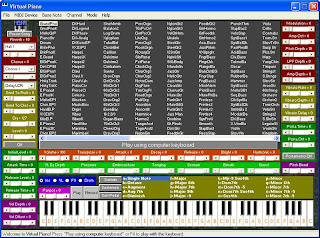
Virtual Piano 3 Full Version - Main Piano Di PC

Virtual Piano 3 Full Version - Main Piano Di PC

 Dari namanya tentu anda sudah tau dong untuk apa software ini ? ,ya dengan virtual piano ini kita bisa memainkan piano di PC layaknya memainkan piano seperti aslinya,dengan ditambahkan lebih dari 600 pilihan instrument serta efek suara lainnya,virtual piano ini bisa melengkapi software virtual musik di PC anda.


Link Download (IDWS) :

Download Virtual Piano 3 Full

Features:
- Choose from over 600 different musical instruments and various sound effects!
- Play like a pro using simply your computer’s keyboard or mouse.
- Fun and easy to understand but powerful user interface.
- A preset song to get you started.
- Record/Play your own song!
- Save your recording to a file!
- Simple mode hides all the complicated options to make Virtual Piano easy to use.
- Export your recording to a .mid file!
- Play the piano using any device connected to your computer!

Percepat Mozilla Firefox Dari about:config

Percepat Mozilla Firefox Dari about:config
Baik lah Teman-Teman , Kali Ini Saya Akan Memposting Yang sepertinya sudah jadul , tapi tak apalah , mungkin ada juga yang belum tau..
judul postingannya adalah Percepat Mozilla Firefox Dari about:config

1.Buka Mozilla Firefox Terlebih Dahulu (Versi Berapa Aja)
2.Ketik Di Addres Bar " about:config " (Tanpa Tanda Petik)
3.Ketik " network.http.max-connections " Double Klik Dan Masukan Value " 64 "
4.Ketik " network.http.max-connections-per-server " Double Klik Dan Masukan Value " 21 "
5.Ketik " network.http.max-persistent-connections-per-server "Double Klik Dan Masukan Value " 8 "
6.Ketik " network.http.pipelining " Double Klik dan Menjadi " True "
7.Ketik " network.http.pipelining.maxrequests " Double Klik dan Masukan Value " 100 "
8.Ketik " network.http.proxy.pipeling " Double Klik Dan Menjadi " True "
9.Langkah Terakhir,Klik Kanan Dimana Saja Pilih : New > Integrar > Lalu Tulis " nglayout.initialpaint.delay "   (Tanpa Tanda Petik) Kemudian Klik OK,Dan Masukan Value " 0 "


Semoga Berhasil


Cara mudah membuat breadcrumb di blogspot

Cara mudah membuat breadcrumb di blogspot

Emh baik sekarag saya jelaskan cara membuatnya , ikuti langkah-langkah berikut :
  1. Masuk ke blogger.
  2. Pilih menu Tata Letak (Layout) » Edit HTML.
  3. Centang tulisan Expand Widget Templates.
  4. Cari kode berikut.

    <b:if cond='data:post.title'>

  5. Tambahkan kode berikut di bawahnya.

    <b:if cond='data:blog.pageType == "item"'>
    <a href='http://namablog.blogspot.com/'>Home</a> &#187;
    <b:if cond='data:post.labels'>
    <b:loop values='data:post.labels' var='label'>
    <a expr:href='data:label.url' rel='tag'><data:label.name/></a>
    <b:if cond='data:label.isLast != "true"'>,</b:if>
    </b:loop>
    &#187;
    </b:if>
    <data:post.title/>
    </b:if>
    jangan lupa ganti tulisan warna biru dengan nama blog anda.

  6. Simpan template.
Anda bisa menambahkan garis di bawah navigasi dengan menambahkan kode <hr/> di bawah kode <data:post.title/> di atas.